Turbo Boost Switcher – autostart under MacOS Big Sur without password prompt
Quickly noted for me, how to set up Turbo Boost Switcher to start automatically under MacOS Big Sur without a password prompt and disable Turbo Boost at startup.
Prerequisite: Turbo Boost Switcher is installed and working manually operated? Yes? Good! –> Close existing running instance of Turbo Boost Switcher NOW.
Create a new file:
sudo nano /Library/LaunchDaemons/com.turbo-boost-switcher.plist
Paste this text and save:
<?xml version="1.0" encoding="UTF-8"?>
<!DOCTYPE plist PUBLIC "-//Apple//DTD PLIST 1.0//EN" "http://www.apple.com/DTDs/PropertyList-1.0.dtd">
<plist version="1.0">
  <dict>
    <key>Label</key>
    <string>com.turbo-boost-switcher</string>
    <key>ProgramArguments</key>
    <array>
      <string>/Applications/Turbo Boost Switcher.app/Contents/MacOS/Turbo Boost Switcher</string>
    </array>
    <key>RunAtLoad</key>
    <true/>
    <key>KeepAlive</key>
    <true/>
  </dict>
</plist>
Start:
sudo launchctl unload /Library/LaunchDaemons/com.turbo-boost-switcher.plist
sudo launchctl load /Library/LaunchDaemons/com.turbo-boost-switcher.plist
Set the checkbox “Disable TB at Launch” in the GUI:
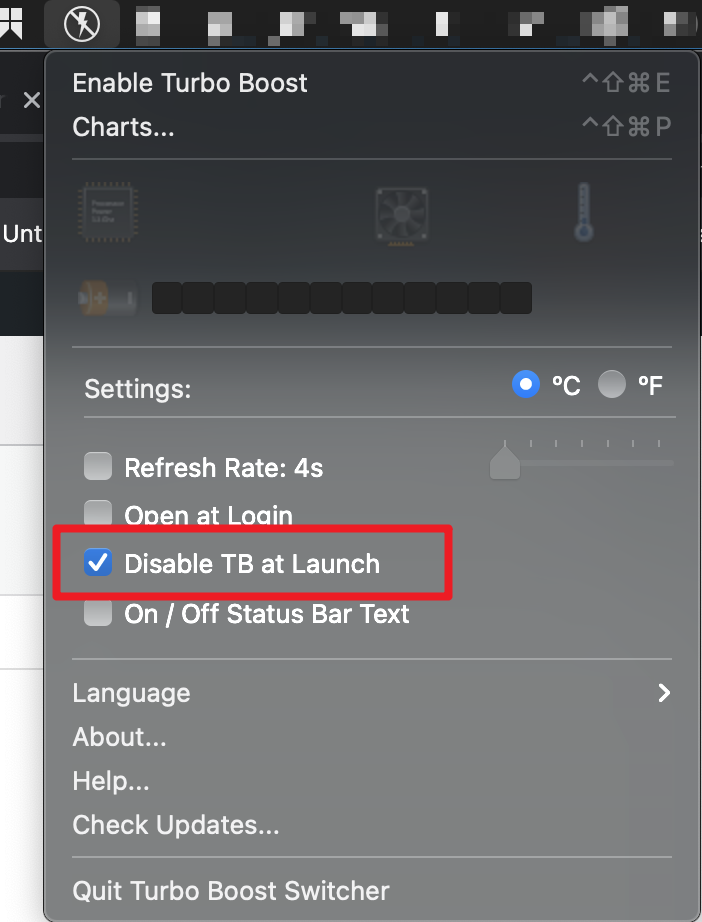
When you restart your Mac, the Menu Bar should display the Turbo Boost Switcher Icon as disabled (as shown in the screenshot above). This can take a few seconds, so be sure to wait a bit after you restarted 🙂

0 yorum